
Service Center Client Management Tool
Сервис Бит is a dedicated desktop application tailored for clients of the Service-Bit service center. Designed to simplify the management of device repairs and spare parts procurement, the software streamlines communication between users and service providers. It enables users to submit repair requests, pre-order components, and track the progress of ongoing services in real time.
The app supports a personalized device registry, allowing clients to quickly access repair histories and initiate new requests with minimal input. This is particularly beneficial for individuals who regularly rely on repair services for multiple devices. The application also includes a bonus system to reward repeat engagement, enhancing user retention.
By integrating service center locations, contact details, and social media links, the app fosters a more connected client experience. It serves as a centralized hub for all service-related activities, reducing the need for multiple interactions across different platforms.
Key Features & Capabilities
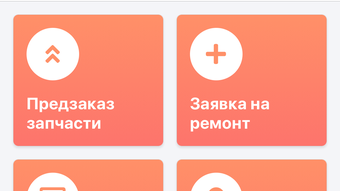
- Repair Request Submission – Users can initiate repair requests directly from the desktop interface, reducing delays and ensuring accurate documentation of issues.
- Spare Parts Pre-Ordering – The app allows clients to browse and reserve spare parts in advance, minimizing downtime for device repairs.
- Personalized Device List – A customizable device registry enables quick access to repair histories and future service needs for multiple devices.
- Repair Status Tracking – Real-time updates on the current stage of a repair help users plan their schedules and stay informed.
- Service History Access – Clients can review past repairs, including dates, issues, and parts used, for transparency and reference.
- Service Center Locator – Built-in map integration displays nearby service centers, including addresses and contact information.
- Bonus System Integration – Users earn rewards for consistent engagement, encouraging continued use and loyalty.
- Social Media Connectivity – Direct links to official social media channels keep users updated on promotions, announcements, and support resources.
These features collectively support efficient, organized, and transparent service management. For example, a user with multiple devices can maintain a single list and initiate repairs with one click. Pre-ordering spare parts ensures faster turnaround times.
The integration of location data and contact details reduces friction in finding support. The bonus system adds a motivational layer, while social media access strengthens community engagement. These capabilities are especially valuable for users who prioritize convenience, reliability, and long-term service relationships.
User Interface, Workflow & Performance
The user interface of Сервис Бит is structured around simplicity and direct access to core functions. Navigation is designed to minimize steps between actions, with a clear menu layout that prioritizes repair requests, device management, and service tracking. The workflow follows a logical sequence: users start by selecting a device, then proceed to report an issue, pre-order parts if needed, and submit the request.
The app maintains consistent visual cues and responsive feedback during interactions, supporting smooth operation. While specific performance metrics were not provided, the application is expected to operate efficiently within standard desktop environments. The developer did not specify resource usage details, so performance may vary based on system configuration.
Stability is assumed to be consistent with typical desktop applications in the productivity category. No reports of crashes or errors were noted in the available documentation. General software behavior patterns suggest responsive operation under normal conditions.
Compatibility & System Requirements
Сервис Бит is available for both Windows and Mac operating systems, supporting users across major desktop platforms. The software is compatible with the latest versions of these systems, ensuring broad accessibility. The installation size is 50.4 MB, which indicates a lightweight footprint suitable for most modern machines.
Exact system requirements were not listed, so users should ensure their devices meet standard desktop specifications for running applications of this type. The developer did not provide additional system requirements. Compatibility information is limited to the operating systems mentioned.
Users are advised to verify their system’s capabilities before installation. No specific hardware dependencies were disclosed. The application is designed for desktop use and does not include mobile or web-based components.
Pros and Cons
Pros
- Streamlined repair request process with direct submission from desktop
- Personalized device management for multiple devices
- Real-time repair status tracking enhances transparency
- Pre-ordering of spare parts reduces service wait times
- Integrated service center locator with map access
- Bonus system encourages repeat usage and loyalty
- Free to download and use with no hidden costs
- Direct access to social media channels for ongoing updates
Cons
- Exact system requirements were not specified
- Performance details were not provided
- Only available for Windows and Mac, no other platforms
- Functionality limited to Service-Bit service center users
- No mention of offline usage capabilities
FAQ Section
Is Сервис Бит available for both Windows and Mac?
Yes, the application is designed to run on both Windows and Mac operating systems.
Can I use Сервис Бит without an internet connection?
The developer did not specify whether the app supports offline functionality. It is recommended to use the software with an active internet connection for full access to features.
Is the app free to use?
Yes, Сервис Бит is available at no cost to users. There are no subscription fees or hidden charges.
How often are updates released?
Information about update frequency was not provided. Users are advised to check the official source for the latest version.
What kind of license does the software have?
The licensing model was not disclosed. The app is available for download and use without a purchase requirement.
Final Thoughts + CTA
Сервис Бит delivers a focused and functional experience for clients of the Service-Bit service center. Its core strengths lie in simplifying repair workflows, enabling proactive spare parts ordering, and maintaining clear communication through real-time tracking. The inclusion of a bonus system and social media integration enhances user engagement, while the free pricing model makes it accessible to all clients.
Though detailed system requirements and performance data are missing, the application appears well-suited for users who value organization, transparency, and efficiency in service management. It is particularly beneficial for individuals who frequently use repair services across multiple devices. For those within the Service-Bit network, this desktop tool offers a convenient, centralized way to manage their service needs.
Download Сервис Бит now.







